Selfie Camera & AI Editor: Mobile AI portraits and creative tools
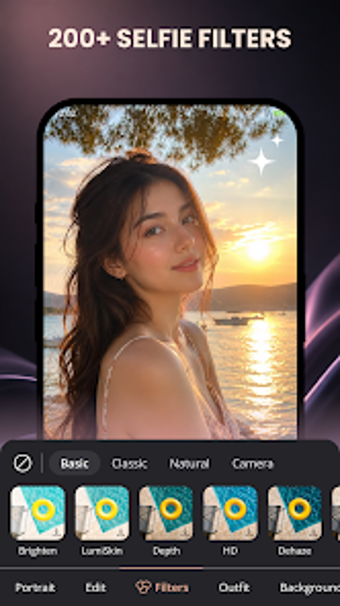
Selfie Camera & AI Editor, developed by Toolbox Pro, addresses mobile portrait capture and AI-driven editing for Android users. The app combines a built-in camera with AI-assisted portrait retouching, generative hair and outfit changes, and image expansion to alter composition on the fly. It includes over 200 real-time color filters, an AI-assisted collage maker, and background replacement tools. Social media enthusiasts and casual creators benefit from rapid, phone-based creative workflows and one-tap edits.
What the app actually does for portrait creators
Selfie Camera targets portrait capture and creative editing: it pairs a native camera module with AI features that perform skin smoothing, feature adjustment, and generative changes such as hair or outfit swaps. The app also offers image expansion to fill or extend photo borders, background removal and preset replacements, plus a collage maker with AI-assisted templates. These combined functions let a creator convert a single selfie into multiple post-ready variations without exporting to other tools.
How device hardware affects editing responsiveness
Performance depends on the handset because system requirements vary by device, so responsiveness and processing time for AI tasks change with hardware. Generative edits, one-tap retouches, and image expansion are compute-intensive by design, therefore older or low-spec Android phones can be slower when applying large changes. Toolbox's broader portfolio and more than two million installs suggest experience with mobile environments, but users should expect differing speeds across models.
Who can use it and how steep the learning curve is
Casual social posters benefit from the app's one-tap retouch pathway and ready-made collage templates, while creators who like experimentation gain from the generative and expansion tools. The presence of both simple and advanced modes means non-technical users can produce quick edits, and more curious users can explore avatar or composition changes. Expect some trial and error to master realistic generative results; the app emphasizes creative choices over purely automatic outcomes.
A capable creative tool for social-focused Android users
Selfie Camera suits Android creators who want phone-based image experimentation and fast portrait edits, with the caveat that edit speed and responsiveness depend on device capability. Test heavier edits on a more powerful handset to judge responsiveness, and use quick edit paths for daily posting. Recommended.